

Westace Casino’s mobile app delivers the complete casino experience to a flexible, secure interface designed for players who favor gaming on the go. It provides quick access to slots, table games, live dealer sessions, account tools, and promotions without requiring a desktop browser. The app is designed to run smoothly across a wide range of modern smartphones and tablets, with straightforward navigation and shorter loading times. Users can handle deposits, withdrawals, and bonus claims directly from the app. This guide covers download instructions, device compatibility, and the key features that make the Westace Casino mobile app a practical choice for mobile players.
Beginning with the Westace Casino Mobile App
Before installing the Westace Casino mobile app, users should ensure that their device meets the minimum operating system specifications and that they have a stable internet connection. The app can be downloaded through the official Westace Casino website or approved platform links. New players may need to complete registration before accessing the full range of games, while existing players can log in with their current credentials. Account verification may be requested depending on local regulatory requirements and payment method choices. Maintaining the device updated and granting the necessary app permissions supports smoother installation and gameplay. The setup process generally requires only a few minutes.
Steps to Download the App on Android
Westace Casino offers a dedicated Android installation package that can be retrieved from the official website. Because some gambling-related applications are blocked in certain app stores, users should adhere to the official download link to ensure they receive the latest secure version. Before starting, Android users may must enable installations from unknown sources in their security settings. This is a standard step for apps released outside the Play Store and can be disabled again after installation. explorez le site The downloaded file should be accessed from the notification bar or file manager. This maintains the installation process straightforward and under the user’s control.

After the package is installed, users can open the Westace Casino app and log in. The app routinely checks for updates when opened, and important security patches may be downloaded in the background. Delete temporary files if an older version was previously installed. Use the numbered steps below for a reliable Android installation. If a warning shows up during installation, users should check that the file was acquired from the official Westace Casino source and not from a third-party mirror. Once access is given, the app icon appears on the home screen, and future updates are straightforward.
- Go to the official Westace Casino website from the Android device.
- Click on the mobile app or download section.
- Save the Westace Casino APK file.
- Open the file and accept the installation when prompted.
- Open the app and log in or register.
Compatible Devices and Optimal Requirements
The Westace Casino mobile app is built to work with a broad range of devices. On Android, the app typically demands Android 8.0 or newer and at least 3 GB of RAM for seamless performance. Devices with weaker specifications may still run the app but could experience reduced loading or heavier battery usage. On iOS, the app works with iPhone and iPad models operating iOS 13 or newer. A screen resolution of at least 720p is advised for clear graphics, while 1080p or greater boosts the live casino experience. These requirements help sustain stable frame rates during animated slot features.
Storage space is a further crucial factor. The original installation size is modest, but game files and updates may require additional space over time. Users should maintain at least 1 GB of available storage to avoid interruptions during updates. A stable Wi-Fi or 4G/5G connection is suggested for live dealer games and cash transactions. The compatibility list below covers commonly compatible device types and essential conditions. Tablets are entirely compatible, and the interface scales on its own to larger screens. Westace Casino regularly tests the app on widely used Android and Apple devices to preserve reliability across multiple manufacturers and regions.
- Android smartphones and tablets with Android 8.0 or newer
- iPhone and iPad with iOS 13 or newer
- A minimum of 3 GB of RAM for Android and 2 GB for iOS
- 1 GB of available storage space recommended
- Steady Wi-Fi, 4G, or 5G connection for live play
Steps to Download the App on iOS
For iPhone and iPad owners, the Westace Casino mobile app is obtainable through the official iOS App Store in eligible regions. Users should find Westace Casino and check the developer name before installing. Apple devices may need the latest iOS version to use the app effectively. If the app is not visible in the App Store, users can access the mobile web version or review the official Westace Casino website for current availability and area restrictions. Installation matches the standard App Store process and does not need altering security settings. The download is processed entirely by Apple’s infrastructure. This provides an extra layer of validation.
After download, users can start the app and sign in. The iOS version is designed for Apple’s interface standards, including gesture navigation and Face ID login where enabled. Notifications may be enabled for exclusive mobile offers, but users can adjust these permissions later. The steps below outline the installation process. Apple users should maintain automatic updates enabled so the app obtains performance upgrades and security updates without manual action. If the app is deleted from the store for a short time, existing installations usually continue to function, but contacting support is suggested for account-specific direction. Manual updates can also be begun from the App Store profile.
- Launch the App Store on the iPhone or iPad.
- Find Westace Casino.
- Pick the official app and click on Get.
- Verify with Face ID, Touch ID, or Apple ID password.
- Open the app and sign in.
Account Administration and Secure Payments
The app offers a comprehensive account dashboard enabling users to update personal details, check transaction history, and adjust notification preferences. Login security features offer two-factor authentication and biometric sign-in on supported devices. Users must complete identity verification when prompted, as this step secures the account and unlocks faster withdrawals. Westace Casino uses encryption to safeguard data transmitted between the app and its servers. The account area also displays active bonuses, wagering progress, and available balance in real time. This central view enables players manage their bankroll without leaving the game screen. The dashboard is accessible from the main menu at any time.
Deposits and withdrawals are processed through secure https://www.sportsnet.ca/nhl/article/report-blackhawks-season-ticket-sales-spike-immediately-after-draft-lottery/ payment methods offered in the player’s region. The app offers cards, e-wallets, and bank transfer options where permitted. Withdrawal requests are managed according to the casino’s standard verification and processing times. Users can keep payment methods for faster deposits, but sensitive financial data is tokenized and not stored directly on the device. Customer support is reachable from within the app for payment-related questions. All cashier pages employ the same encryption standards as the desktop platform. Users ought to always log out when using a shared device. This simple habit reduces unauthorized access risk. https://westacescasino.fr/app/
Core Casino Features in the Mobile App
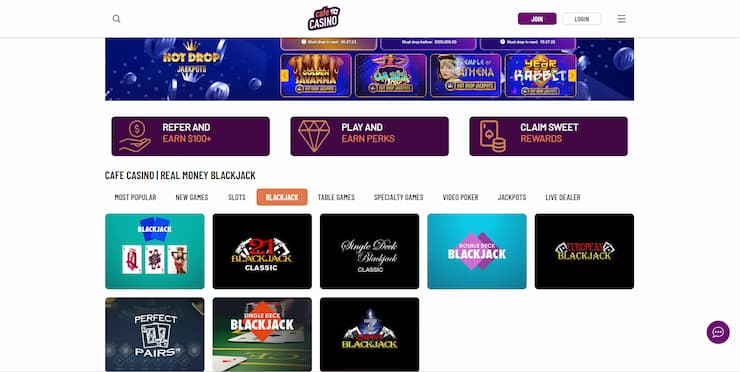
The Westace Casino mobile app focuses on fast navigation and complete access to the game library. Players can explore slot titles, progressive jackpots, table games, and live dealer rooms from a single dashboard. Search filters and categories aid users locate specific games quickly. The app also offers favorite lists, enabling players to save titles for future sessions. Game loading times are improved for mobile connections, and most titles run directly inside the app without external players. This integrated approach reduces the need to switch between browser tabs. The layout adapts to portrait and landscape orientation.
The live dealer section broadcasts blackjack, roulette, baccarat, and game-show tables in real time. Video quality changes based on the user’s connection speed, helping to reduce buffering. Touch controls are crafted for one-handed use, and the bet placement system utilizes larger buttons to minimize input errors. The list below encompasses the main mobile features. The app also delivers responsible gaming reminders and session history, so players can follow their activity easily. The interface stays consistent between Android and iOS, which reduces the learning curve for users who switch devices. That consistency makes switching between platforms feel natural.
- Browse, filter, and favorite tools for the game library
- Mobile-optimized slots and table games
- Live casino rooms with adaptive video quality
- Single-tap betting and quick deposit access
- Activity history and responsible gaming tools
Mobile Bonuses and Promotions
The mobile app provides users unrestricted access to Westace Casino promotions, featuring welcome offers, deposit matches, free spins, and cashback deals. Some campaigns are available only through the mobile app, so users who install the app may see exclusive mobile rewards in the promotions section. Bonus terms, including wagering requirements and game contributions, are shown clearly within the app. Players can enroll to bonuses with a single tap, and progress bars display how much of the wagering requirement has been completed. Notifications can notify users when a new promotion starts or when a bonus is about to expire. Check the conditions before claiming any offer.
Players can see all active offers from the promotions tab inside the app. The interface divides deposit bonuses, free spins, and cashback deals so users can evaluate options quickly. Bonus codes may be typed during the deposit process or in a dedicated field. Westace Casino also sends push notifications for time-sensitive offers, but users can turn these alerts off without affecting account status. Wagering progress is adjusted automatically after each qualifying bet. If a bonus is not applied, players should ensure that they opted in before the deposit and met the minimum amount. Customer support can examine the claim and provide explanation.
Recommendations for a Flawless Mobile Experience
To achieve the best performance from the Westace Casino mobile app, users should close background applications that use up memory and connect to a stable Wi-Fi connection during live dealer sessions. Clearing the app cache periodically can also minimize lag on Android devices. On iOS, removing the app is not recommended because it may erase local settings and demand a fresh login. Ensuring the device operating system updated helps avoid compatibility issues and security vulnerabilities. If the app freezes, restarting the device often solves temporary problems more effectively than repeated force-closing. Regular reboots also renew network settings.
Battery consumption can be controlled by dimming screen brightness and enabling power-saving mode when playing slots for extended periods. Users should also verify that the app has permission to send notifications only if they want to receive promotional updates. The checklist below highlights the most effective maintenance habits. For high-stakes live play, a wired headset or high-quality earbuds can boost audio clarity and reduce latency. If connection interruptions happen during a game round, the app’s safe-state system is built to protect the outcome and present the result after reconnecting. This system helps uphold fair play.
- Shut down unused apps before launch
- Employ stable Wi-Fi for live dealer games
- Upgrade the device operating system regularly
- Wipe the Android cache when performance drops
- Charge the device or use power-saving mode for long sessions
FAQ
Is the
Yes. The Westace Casino mobile app is available at no cost for Android and iOS devices. Users should download the app from the legitimate Westace Casino website or the iOS App Store to steer clear of unsafe copies. No purchase is required to install or browse the game library. Some games may be accessible in demo mode, but real-money play demands a deposit. Any data charges from a mobile network are the user’s obligation.
Is it possible to use the same account on mobile and desktop?
That is correct. Players can use the same Westace Casino login details across the mobile app and the desktop website. Balances, bonuses, game history, and account settings are synchronized in real time. There is not a need to create a separate mobile account. If a user modifies their password on one platform, the new password works everywhere. For security reasons, a new device login may need an additional verification code.
What steps should I take if the Android download does not start?
First verify that the device has enough free storage and a stable internet connection. Users should also confirm that their browser is not blocking downloads from the legitimate Westace Casino website. If the issue remains, they can clear the browser cache or try a different browser. On some Android versions, the download may appear only after enabling installations from unknown sources. Reach out to Westace Casino support if the file still does not download.
Do all desktop games available in the mobile app?
Most desktop games are accessible in the Westace Casino mobile app. The game library is optimized for touch controls and smaller screens, but a small number of older titles may not yet be mobile-compatible. New releases are typically designed for both desktop and mobile from launch. Players can use the search or category filters to check availability. The app regularly updates its catalog to add mobile titles and improve existing versions.
How can I update the Westace Casino mobile app?
On iOS, users should activate automatic updates or manually update the app from the App Store profile. On Android, the app looks for updates when opened and may prompt the user to download the latest package from the authorized website. Apply updates because they include security patches, performance improvements, and new features. If an update is unsuccessful, users should free storage space and retry.